HTMX + Spring Boot: Building a Web App Without a Frontend Framework
Table of Contents
Open Table of Contents
Brief
My goal is to make posts like this the SIMPLEST place on the internet to learn how to do things that caused me trouble. This one is about the trouble I didn’t have, for once: I rebuilt a small interactive web app — a notepad in the spirit of my CachePad project — using HTMX and Thymeleaf on Spring Boot 4, and the whole thing is one controller, two templates, and zero build tooling.
If you’re a Spring developer who dreads the node_modules directory, this post is for you. The complete app is at github.com/StevenPG/DemosAndArticleContent.
The Idea in One Paragraph
HTMX is a ~14kB (gzipped) script that lets any HTML element make HTTP requests and swap the response into the DOM. Instead of your server returning JSON that a JavaScript framework renders client-side, your server returns HTML fragments and HTMX puts them where they belong. Your “frontend framework” becomes Spring MVC + Thymeleaf — tools you already know — and the browser goes back to being a hypertext client. The pattern even has a nostalgic name: it’s server-side rendering with partial updates, the thing we did before SPAs, minus the full page reloads that made it feel clunky.
Setup: The Entire Frontend Toolchain
dependencies {
    implementation("org.springframework.boot:spring-boot-starter-web")
    implementation("org.springframework.boot:spring-boot-starter-thymeleaf")
    // htmx served locally as a webjar — this line IS the frontend build
    implementation("org.webjars.npm:htmx.org:2.0.4")
}<script src="/webjars/htmx.org/2.0.4/dist/htmx.min.js"></script>No package.json, no bundler config, no transpiler, no lockfile drift, no npm audit noise in CI. I want to be fair to the React ecosystem — it has answers to all of these — but the absence of the entire category of problem is the point.
The App: Notes with Live Search and Inline Editing
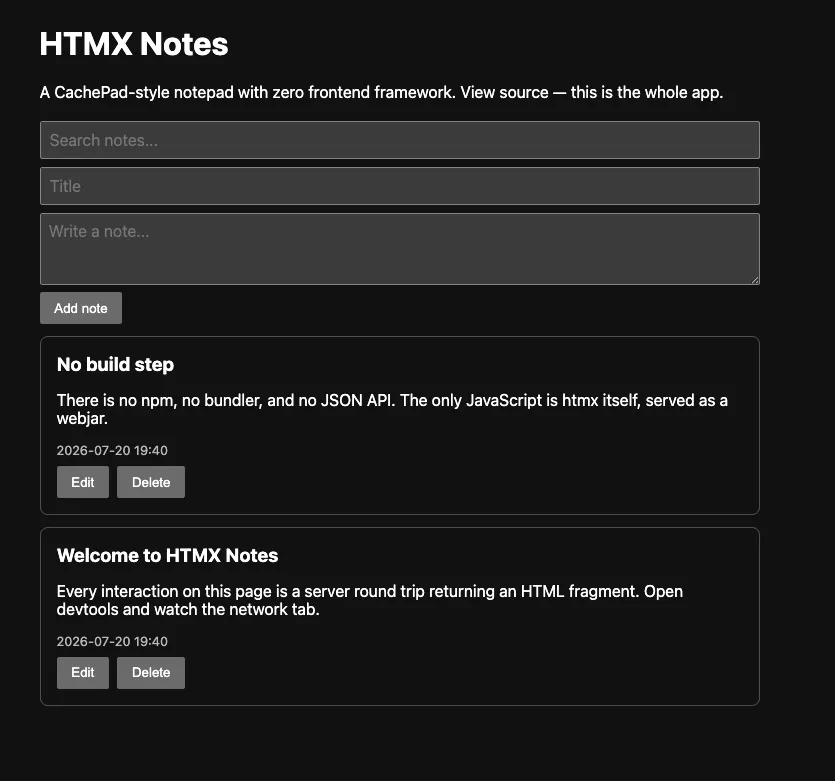
The demo is a CachePad-style notepad: create notes, edit them inline, delete them, and filter with an as-you-type search. Every one of those interactions follows the same three-step pattern, so once you’ve seen one, you’ve seen the architecture.
Pattern, Step 1: An Element Declares a Request
The search box, in the page template:
<input
  type="search"
  name="q"
  placeholder="Search notes..."
  hx-get="/notes"
  hx-trigger="input changed delay:300ms, keyup[key=='Enter']"
  hx-target="#note-list"
  hx-swap="outerHTML"
/>
Read it like English: on input (debounced 300ms), GET /notes?q=..., take the response and replace #note-list with it. That delay:300ms modifier is a debounced live search — a thing that takes a useEffect, a timer ref, and a cleanup function in React — as an HTML attribute.
Pattern, Step 2: The Controller Returns a Fragment
@GetMapping("/notes")
String search(@RequestParam(defaultValue = "") String q, Model model) {
    model.addAttribute("notes", store.findAll(q));
    return "fragments :: note-list";
}
That return value is the only new trick on the Spring side: "fragments :: note-list" tells Thymeleaf to render just one fragment from fragments.html, not a full page. The same controller pattern serves full pages (return "index") and partial updates from the same templates.
Pattern, Step 3: The Fragment Is Just HTML
<div id="note-list" th:fragment="note-list">
  <th:block th:each="note : ${notes}">
    <div th:replace="~{fragments :: note-card}"></div>
  </th:block>
  <p th:if="${#lists.isEmpty(notes)}">No notes match.</p>
</div>
That’s the whole loop. There is no client-side state to reconcile with server state, because there is no client-side state. The server’s render is the state.
Inline Editing, Same Pattern
Clicking Edit swaps a single card for its edit form; Save swaps it back:
<button
  th:attr="hx-get='/notes/' + ${note.id} + '/edit',hx-target='#note-' + ${note.id}"
  hx-swap="outerHTML"
>
  Edit
</button>@GetMapping("/notes/{id}/edit")
String editForm(@PathVariable long id, Model model) {
model.addAttribute("note", store.find(id));
return "fragments :: note-edit";
}
@PutMapping("/notes/{id}")
String update(@PathVariable long id, @RequestParam String title,
@RequestParam String body, Model model) {
model.addAttribute("note", store.update(id, title, body));
return "fragments :: note-card";
}Two bonus details in the full demo worth noticing: HTMX issues real PUT and DELETE requests from plain HTML (something forms never could), and hx-confirm="Delete this note?" gets you a confirmation dialog for free.
Run it and keep the browser network tab open — every interaction is a small HTML response, typically a few hundred bytes.
The Honest Comparison vs React
I built the equivalent app in React to keep this fair. Both are “small tool” scale, which is exactly the scale in question.
| HTMX + Thymeleaf | React (Vite) | |
|---|---|---|
| JS shipped to browser | ~14 kB (htmx, gzipped) | ~60+ kB (react + react-dom, gzipped) before any app code |
| Build step | none | Vite + node toolchain |
| Files for the notes app | 1 controller, 2 templates | components, hooks, API client, plus a JSON API on the server anyway |
| State lives | server only | server + client copy, kept in sync by you |
| Latency model | round trip per interaction | instant local updates possible |
| Offline capability | none | full (this is CachePad’s whole thing) |
The last two rows are the real decision criteria, so let me be direct about them:
Where HTMX wins: server-owned data with CRUD-and-search interactions — admin panels, internal tools, dashboards, form-heavy apps. Which is, honestly, most of the web apps Spring shops build. The complexity savings are not marginal; entire layers (JSON API design, client state management, API client code) simply don’t exist.
Where React wins: when interactions must not wait on a round trip. Rich client state, optimistic updates, drag-and-drop, offline-first. CachePad itself is the counterexample proving the rule — it works offline in your browser with no server, which is exactly the app HTMX structurally cannot be. (More on how CachePad does that in a few days.)
Production Notes
hx-boostupgrades regular links/forms to AJAX navigation site-wide — progressive enhancement with a one-attribute spend.- The htmx-spring-boot library (Wim Deblauwe) adds nice-to-haves —
HtmxRequestargument resolvers, response headers for triggers/redirects, out-of-band swap helpers — worth it once you go past demo scale. - Security is refreshingly boring: it’s all just Spring MVC requests, so Spring Security, CSRF, and sessions work exactly as they always did. Thymeleaf’s
th:textescaping covers XSS the same as any server-rendered app. - Validation errors render the same way everything else does: return the form fragment with error messages in it.
Summary
HTMX collapses the frontend stack for server-owned-data apps into attributes on your HTML and fragments from your existing template engine. For the internal tools and CRUD apps that make up most Spring work, you write dramatically less code, ship a tenth of the JavaScript, and never touch npm — and when an app genuinely needs client-side state (offline notepads, say), you’ll know, because it will be obvious the round trip can’t be there.
Clone the demo, run ./gradlew bootRun, and view source on what loads — the entire app fits in your head. Simple!
In case you don’t want to run the demo, here’s what the project looks like while running: